

Video Tutorial
What Statisfy Pulls from Jira
Each Jira issue becomes a Statisfy task (or — in projection-only mode — only writes back to the linked account without creating a task; see Projection Mode below).
Prerequisites
- Admin access to both Jira and Statisfy
- Jira Cloud (Server / Data Center is not supported through the self-serve flow)
- The Jira projects you want to sync are accessible to the account that runs the OAuth connection
Connect Jira to Statisfy
- Log in to Statisfy.
-
Navigate to Integrations → Admin Apps → Jira → Connect.
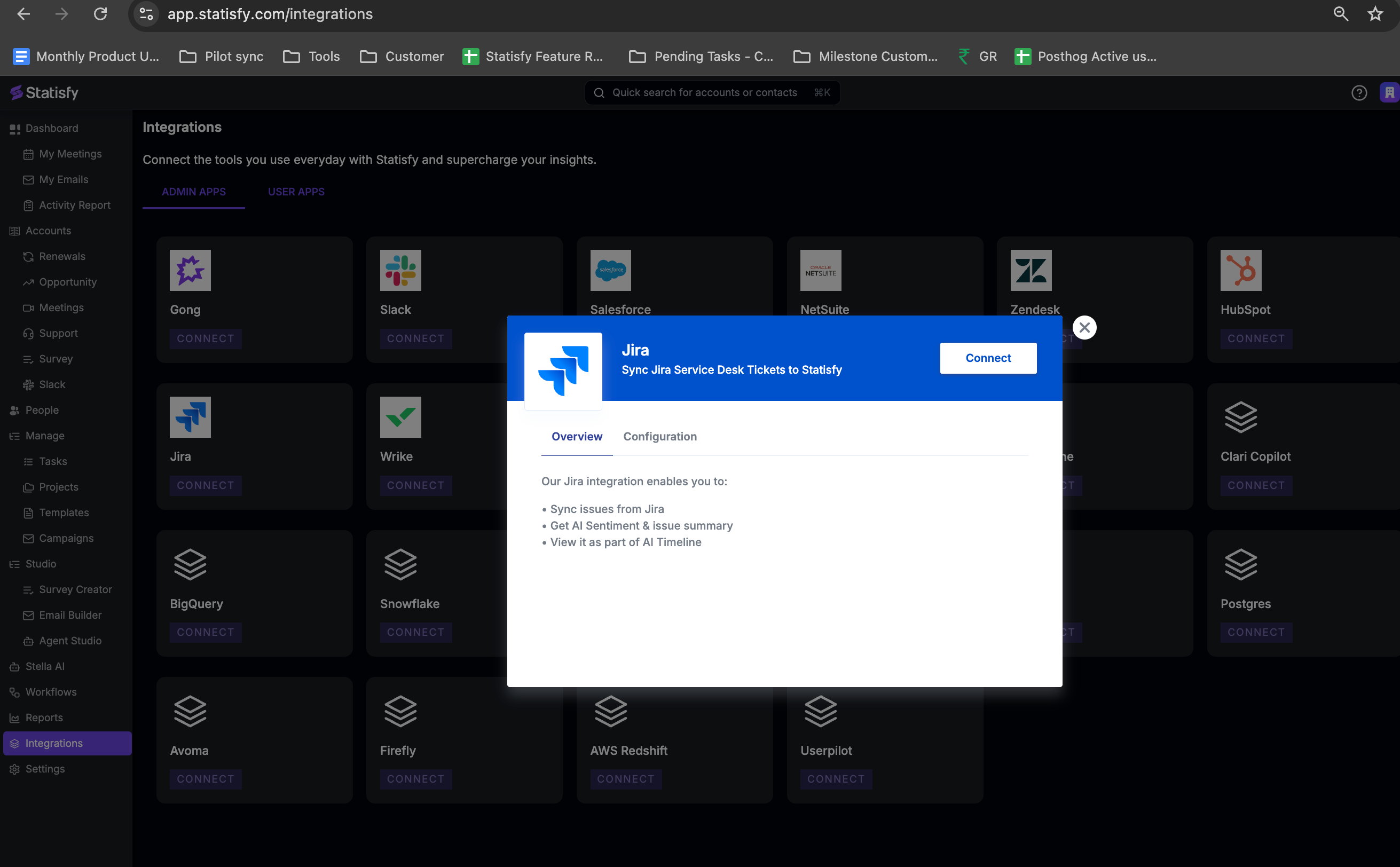
- Complete the OAuth authorization flow to grant Statisfy read access to your Jira instance.
- Once connected, Jira appears as Connected on the Integrations page.
Jira and Jira Service Management are configured separately. If you use both, connect each one and configure its own project rules. They appear as two integrations: Jira and Jira Service Management.
Configure Project Rules
Open Integrations → Jira → Settings. The settings page is organized around project rules: each rule is a saved configuration for one Jira project (and, optionally, a subset of its issue types) that tells Statisfy how to handle issues from that project. You can have multiple rules per project — for example, one rule forBug and Story issue types in the PROD project, and a different rule for Epic issues in the same project with different field mappings and customer-matching logic.
Anatomy of a Project Rule
Each rule has the following sections:Add a Project Rule
- On the Settings page, click Add Project Rule.
- Pick the project from the dropdown — Statisfy lists projects your OAuth user can access.
-
(Optional) Add an Issue Type Filter — pick
includeorexcludeand choose one or more issue type names. Leave empty to match all issue types in the project. - Configure Customer Resolution (next section).
- Configure Field Whitelist (next section).
- Save. The rule will run on the next scheduled sync; use Run Sync Job to pull immediately.
Customer Resolution
Customer resolution decides which Statisfy account each Jira issue belongs to. You configure a chain of resolvers — Statisfy tries each in order and stops at the first match. This handles cases where, for example, an Organization field is set on most issues but a few rely on a Reporter’s email domain. Each resolver in the chain has:- Resolver type — how the value identifies an account
- Source — which Jira field, custom field, or attribute to read
- Transforms (optional) — reshape the value before matching (strip a prefix, regex-extract, etc.)
Source examples
The “source” for a resolver can be:- A standard Jira field (
reporter,assignee,summary) - A custom field — referenced by Jira custom field ID (
customfield_10101) or by display name (Customer Account) - A path into the reporter’s profile (
reporter.emailAddress) - A JSM Organization
Transforms before matching
If the source value isn’t quite what the resolver expects, chain one or more column transformers before it:strip_prefix, regex_extract, split_first_token, lookup, skip_if_equals, skip_if_contains. For example: extract a domain from an email with regex_extract (@(.+)$), or strip a crm_ prefix from a custom field value.
Support Multiple Customers
By default, each issue links to at most one account. Toggle Support Multiple Customers on if a single issue legitimately belongs to several accounts (for example, a multi-tenant incident). Statisfy will write the task and any account-field updates against every match.Field Whitelist
The field whitelist controls which Jira fields are copied to Statisfy, and where. There are two whitelists per rule:- Task fields — copied to the Statisfy task created from the issue
- Account fields — copied to the Statisfy account the issue resolves to
- Jira field — by custom field ID or display name
- Statisfy field key — the target custom field on the task or account
Example account-field mappings:
The Statisfy custom field must exist in Object Manager with a compatible type (e.g., a date field for date values). Create it there first if needed.
Tenant-level defaults
You can set a tenant-level default whitelist that applies to every rule. Per-rule whitelists override the defaults — useful when one project needs a totally different mapping but most projects share the same handful of fields.Issue Links
Turn on Issue Links to add a JIRA Link field to every synced task, pointing back at the source issue in Jira. This is a tenant-level setting on the Jira settings page (not per-rule), and it’s off by default. When enabled, each synced task gets aJIRA Link URL field populated with <Site Base URL>/browse/<ISSUE-KEY> — clicking it opens the issue in Jira. Statisfy manages the value and marks the field read-only on the task, so an accidental edit in Statisfy can’t freeze the link on a stale URL.
Enable Issue Links
- On the Jira settings page, find the Issue links card.
- Toggle Link tasks to their JIRA issue on.
-
Confirm the Base URL. Statisfy prefills it from your Jira site (e.g.
https://acme.atlassian.net):- Leave the prefill as-is if your team clicks straight into
*.atlassian.net. - Override it if you front Jira on your own domain (e.g.
https://jira.acme.com). The URL Statisfy prefills is Jira’s ownbaseUrl, which may not match the address your team actually uses.
- Leave the prefill as-is if your team clicks straight into
-
Click Save. The URL must start with
https://; saving the toggle on with no URL is rejected.
JIRA Link field is provisioned on save and populated on the next sync (or on Run Sync Job). It appears on the task alongside your other field-whitelist mappings.
Scope
Issue Links apply to tasks only:- Task rules — every synced task gets the link.
- Projection-mode rules (
Creates Taskoff) — no task is created, so no link is written. Account fields are unaffected. - Jira Service Management — JSM tickets sync into Statisfy as conversation objects, not tasks, and do not participate.
Turning Issue Links off
Switching the toggle off stops new writes to theJIRA Link field. Links already on existing tasks stay in place, and the custom field itself stays in Object Manager. If you want to remove the field entirely, delete it from Object Manager — Statisfy won’t do that for you, because deleting a populated field is destructive.
Projection Mode (creates_task = false)
Some Jira projects are useful as a signal source on the account, but you don’t want every issue to become a task in Statisfy. For those, turn off Creates Task on the rule. In projection mode, the rule still:- Resolves each matching issue to an account
- Applies the account field whitelist (copies Jira fields to the account)
- Create a Statisfy task for the issue
Schedule
Project rules inherit the integration’s default cadence (typicallyWEEKLY). To run a rule more often, override the schedule on the rule — HOURLY through MONTHLY are available. See Schedule.
Sync Behavior
Scheduled Jobs:- Each rule pulls issues updated since the last sync.
- The first run after connecting is a bootstrap covering the last 30 days; subsequent runs only fetch deltas.
- Inactive rules are skipped.
- Per-rule errors are logged but do not block other rules from running.
- Issues that match no resolver are skipped (logged for audit).
Run a Sync On Demand
Use the Run Sync Job button on the settings page to enqueue an immediate sync without waiting for the schedule. The job’s status (queued / running / completed / failed) and timestamps show on the same page.Configuration History
Every save creates a new version. The header shows whether the active config isDatabase (vN), Default (Code), or Not Configured. See Configuration History.
Security
- The OAuth connection uses read-only Jira scopes — Statisfy cannot modify issues, projects, or users.
- Tokens are stored encrypted in Google Cloud Secret Manager and refreshed automatically.
- Project rules are only ever applied to projects your OAuth user can access — losing access to a project in Jira immediately stops Statisfy from pulling it.
Troubleshooting
No issues are syncing
No issues are syncing
- Confirm there is at least one active project rule.
- Check that the OAuth user can see issues in the project (sign in to Jira as that user and open the project).
- Use Run Sync Job and watch the job status — failures show the underlying error.
Issues sync but don't link to accounts
Issues sync but don't link to accounts
- Verify the Customer Resolution chain points at a field that is actually populated on the issues.
- Run a preview in the rule editor — Statisfy will show the resolver result for a sample of issues.
- Add a fallback resolver (e.g., email domain) to handle issues missing the primary identifier.
- For Custom Field resolvers, confirm the Statisfy custom field is populated on the target accounts (the value on the issue has to match a value on the account).
A Jira field isn't showing up in Statisfy
A Jira field isn't showing up in Statisfy
- Confirm the field is in the rule’s Field Whitelist (task or account, depending on where you expect it).
- Confirm the Statisfy custom field exists in Object Manager with a compatible type.
- For custom fields, prefer the Jira custom field ID (
customfield_10042) over the display name to avoid ambiguity if a field is renamed.
Wrong issue types are being pulled
Wrong issue types are being pulled
- Use the rule’s Issue Type Filter with
includeto whitelist exactly the types you want, orexcludeto drop noisy ones (e.g.,Sub-task). - Filters are applied at sync time, so changes only affect issues fetched after the next run.
One issue should create tasks for multiple accounts
One issue should create tasks for multiple accounts
- Turn on Support Multiple Customers on the rule.
- Configure resolvers that can produce multiple matches (e.g., a multi-value custom field of organization IDs).