

Only admins can see the audit log.
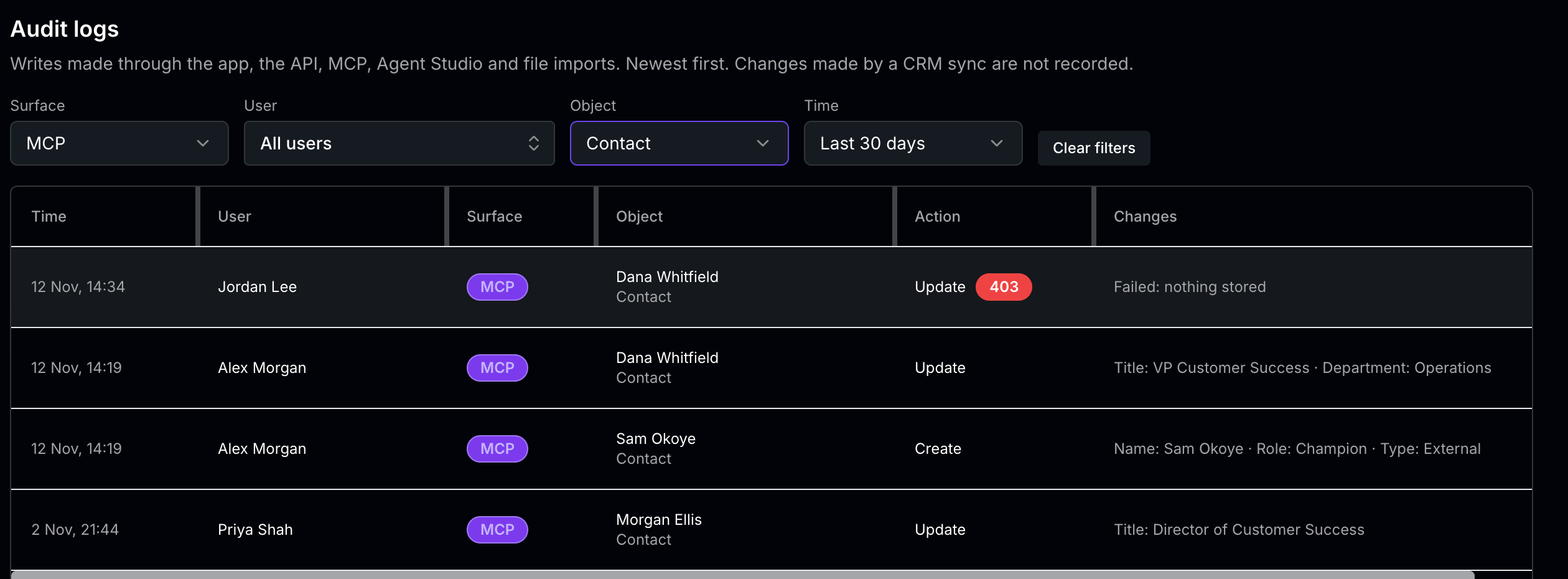
What’s recorded
The audit log records changes: creates, updates, and deletes. Reading data isn’t recorded. Changes are recorded from five surfaces:Changes made by a CRM sync aren’t recorded in the audit log.
Read a row
Click a row to expand it and see every field the change stored, and its status.
Filter the log
Use the filters above the list to narrow it down:- Surface: App, API, MCP, Agent Studio, or File import
- User: one person
- Object: Account, Opportunity, Contact, View, Task, Project, Activity, Field, Portal, or File import
- Time: Last 24 hours, Last 7 days (the default), Last 30 days, or All time
Common questions
Who changed a field on this record?
Who changed a field on this record?
Set Object to the record’s type, and Time to cover when it changed. Then look for the record in the Object column, and read the Changes column.
What have AI assistants changed through MCP?
What have AI assistants changed through MCP?
Set Surface to MCP. This shows changes from every MCP connection, such as Claude, Claude Code, or another MCP client. Each row shows the person whose connection made the change, but not which app made it. To see which apps each person has connected, or to disconnect one, see Manage MCP connections.
Why don't I see a change our CRM made?
Why don't I see a change our CRM made?
Changes made by a CRM sync aren’t recorded in the audit log.