

Object Manager
The Object Manager is your central hub for configuring Statisfy’s data model. Manage fields across all entity types, set up products and dimensions, configure CRM sync, and create custom objects.Accessing Object Manager
Navigate to Settings > Object Manager (app.statisfy.com/settings?tab=object-manager). You need admin permissions to access this page.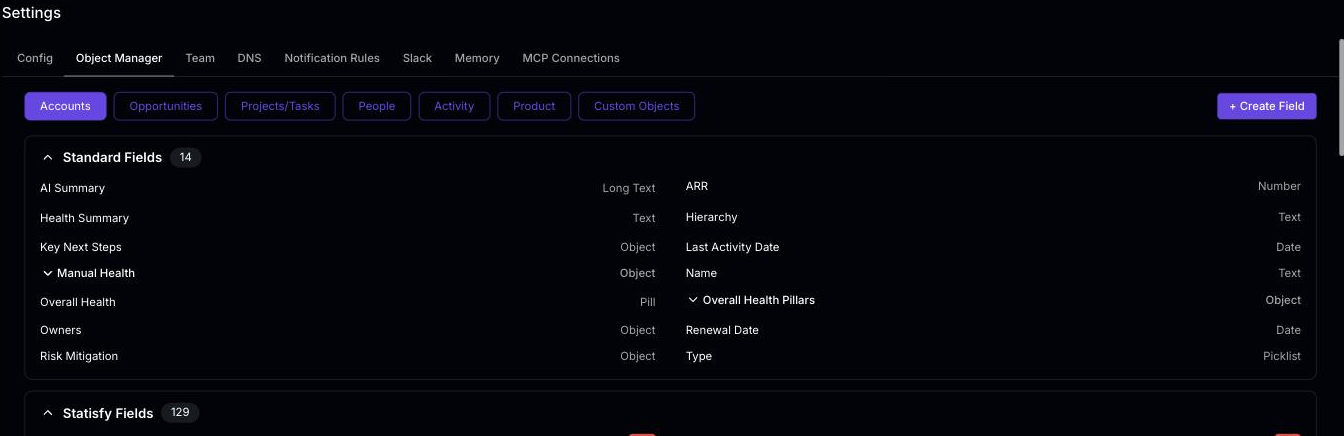
Entity Tabs
The Object Manager is organized by entity type. Select a tab at the top to manage that entity:Field Categories
Within each entity tab (except Product and Custom Objects), fields are organized into collapsible sections. Each section shows a badge with the field count.Standard Fields
Built-in fields provided by Statisfy. These cannot be deleted or renamed, but you can configure visibility, mandatory status, and CRM mapping.
Statisfy Fields
Custom fields you’ve created to capture additional data specific to your business needs. Fully editable and deletable.
CRM Fields
Fields synced from your connected CRM (Salesforce, HubSpot, etc.). Grouped by source. Includes upstream sync toggle for bidirectional sync.
Supported Field Types
Creating a Custom Field
- Select the entity tab (e.g., Accounts)
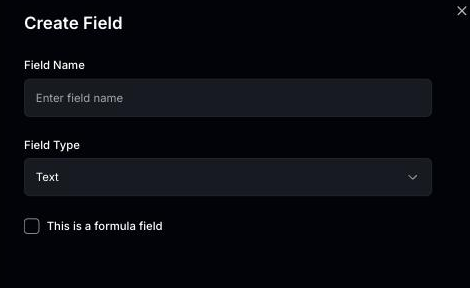
- Click + Create Field in the top-right corner
- Enter a Field Name and choose a Field Type
- Optionally check This is a formula field to make it a computed field (see Formula Fields)
-
Click Save
Editing a Field
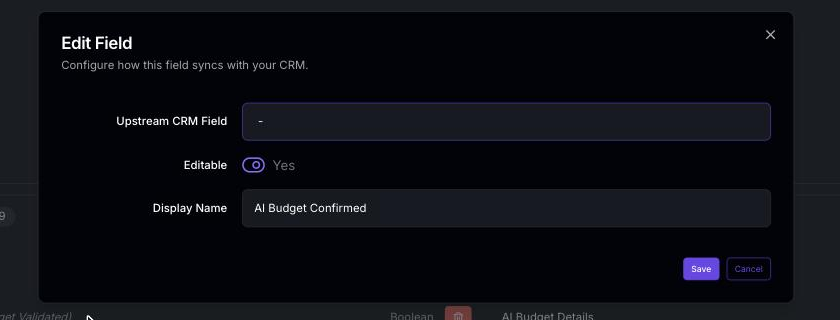
Hover over any field and click the pencil (edit) icon next to its name to open the Edit Field dialog. The available options depend on the field type and whether it’s a standard, Statisfy, or CRM field.Options for Statisfy (Custom) Fields
Options for CRM Fields
Options for Opportunity and Projects/Tasks Fields
These entity types have additional field-level controls: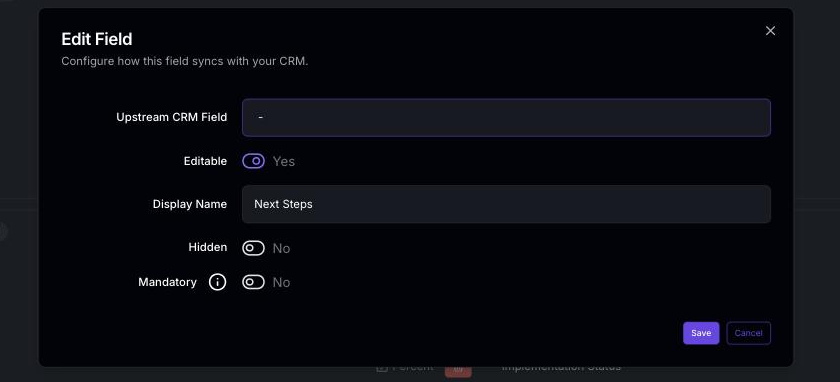
Filter Conditions on mandatory opportunity fields
When you turn on Mandatory for an opportunity field, you can attach Filter Conditions so the field is only required when the opportunity matches. The builder is the same one used elsewhere in Object Manager, and every condition shape it exposes is enforced when the opportunity is saved:- Stage, owner, and other picklists —
is,is not,in,not in. - Numbers, dates, and datetimes —
equals,greater than,greater than or equal,less than,less than or equal. Date fields also support the builder’s relative-date presets (in the last…,not in the last…,between…, including fiscal-quarter presets, which use the same fiscal-quarter start as segment filters). - Multi-select and lookup fields —
contains,in, andnot inmatch against the selected members, not the container. - Derived opportunity conditions —
is closedandis wonare evaluated against the pending stage change, so a rule like “Close reason is required when the deal is closed” fires on the save that closes the deal. - Grouped logic — mix
ANDandORgroups; empty groups are ignored rather than treated as matched.
0 or false counts as a real value, so a number field the user genuinely set to 0 passes the check and a field the user left blank does not.
Filter Conditions on mandatory fields are enforced for opportunities today. The same builder appears when you edit project/task fields, but those rules are not enforced on save yet.
Picklist and Pill Options
For picklist (dropdown) fields and pill (colored label) fields, the edit dialog includes an options editor where you can add, remove, and reorder the available choices. Pill options also support setting a custom color for each value.Lifecycle Stage Fields
Stage-type fields — such as an opportunity’s Stage — appear in Object Manager with the Lifecycle Stage type. Their edit dialog includes a stages editor where each stage has:- a display label — the friendly name users see everywhere the stage appears, including list views, filters, and CSV exports
- an identifier — the stored value behind it; identifiers must be unique within the field
For stage fields synced from your CRM, keep the stage list aligned with the source system — the stored values must match what your CRM sends.
Formula Fields
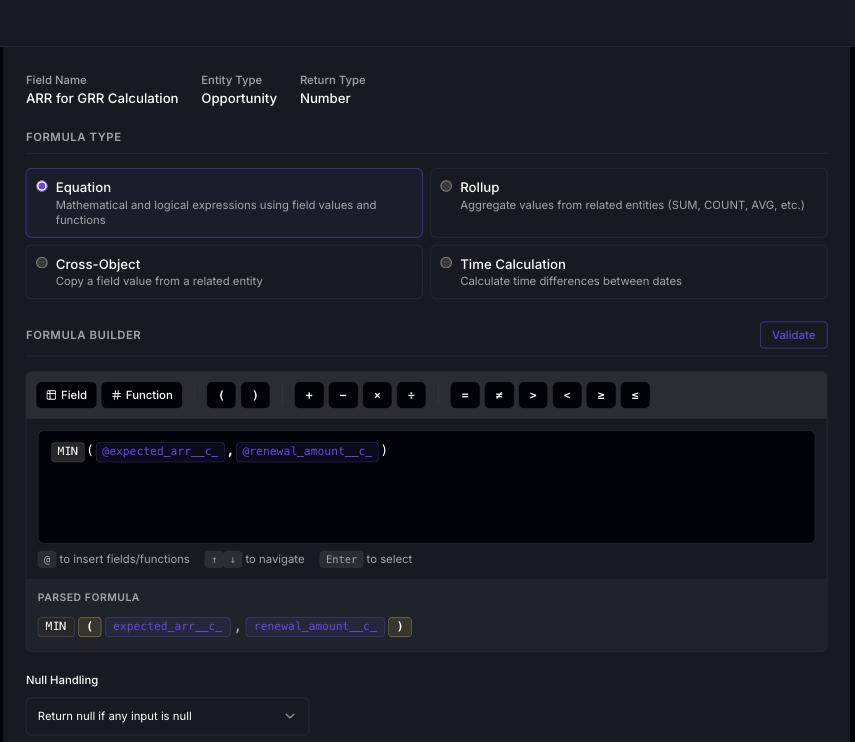
Formula fields are special custom fields whose values are computed automatically from an expression you define. They are read-only — users cannot edit their values directly.Equation
Write custom expressions with fields, functions, and operators. Supports arithmetic, string operations, conditionals (IF/CASE), and 30+ built-in functions.
Rollup
Aggregate values from related entities — SUM, COUNT, MIN, MAX, AVG, MEDIAN, FIRST, LAST, CONCAT, or COLLECT_UNIQUE — with optional filters.
Cross-Object
Pull a field value from a related entity (e.g., parent account name, CSM email) with optional text transforms.
Time Calculation
Calculate time differences — days until renewal, time since last activity, or duration between two dates.
Creating a Formula Field
- Select an entity tab and click + Create Field
- Choose a field type (Text, Number, Date, Boolean, Currency, etc.)
- Check This is a formula field and click Save
- The formula editor opens — select a formula type and configure it
- Use Validate to check for errors, Preview to test against sample records, then Save
Available Relationships for Rollups
Rollup and cross-object formulas traverse relationships to access related data. The available relationships depend on the entity type:Editing a Formula Field
Formula fields show an Edit Formula link in the field edit dialog. Click it to open the dedicated formula editor where you can modify the expression, change the formula type, or update filters and aggregations.For the full formula reference — including all functions, operators, aggregation types, filter operators, and examples — see the dedicated Formula Fields guide.
Deleting a Custom Field
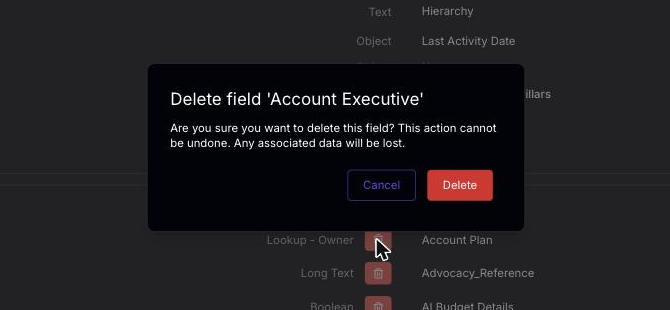
- Click the trash (delete) icon on the Statisfy field you want to remove
- Confirm the deletion in the dialog
CRM Sync Configuration
Upstream Sync Toggle
For CRM field sections (Salesforce, HubSpot), an upstream sync checkbox appears in the section header. This controls whether fields are synced from your CRM into Statisfy for that entity type.Field Mapping
You can map fields between Statisfy and your CRM in two directions:- Upstream CRM Field — On Statisfy custom fields, select which CRM field should populate this field (CRM → Statisfy)
- Downstream Statisfy Field — On CRM fields, select which Statisfy custom field this CRM field should populate (CRM → Statisfy)
Per-Field Upstream Target Object
Some standard fields contain rich, nested data (most notably Activity fields like Meeting Activity and its Transcript sub-field) that doesn’t map cleanly to a single CRM column. For these fields, Object Manager exposes an Upstream Target Object picker so you can choose exactly which CRM object the data should land in.- Expand the field in Object Manager. Fields that support per-field sync show an Upstream Target Object button under the field header.
- Click the button to open the target-object picker.
-
Pick the destination object in your connected CRM — for example, sync Meeting Activity into Salesforce
Eventor HubSpotMeeting, and sync the Transcript sub-field into a custom long-text field on the same object. - Save. From the next sync onward, Statisfy writes the field’s value to the selected target object whenever the record changes.
- A CRM integration (Salesforce or HubSpot) is connected
- For sub-fields like Transcript, the parent field (Meeting Activity) must have upstream sync enabled first — otherwise the picker shows “Enable Meeting Activity upstream sync to configure transcript sync.”
If no CRM is connected, the field shows “Connect a CRM integration (HubSpot or Salesforce) to configure upstream sync.” instead of the picker. Connect a CRM under Integrations first, then return to Object Manager.
Projects/Tasks and Activity: Sub-Type Configuration
For Projects/Tasks and Activity entities, fields can be configured per sub-type (e.g., per task type or per activity type). This allows you to:- Show or hide a field for specific task/activity types
- Make a field mandatory only for certain types
- Associate custom fields with specific sub-types
Products & Dimensions
The Product tab has a dedicated interface for managing your product catalog and usage dimensions. Each product appears as a card with its details, its dimensions, and controls for editing, adding dimensions, and reordering.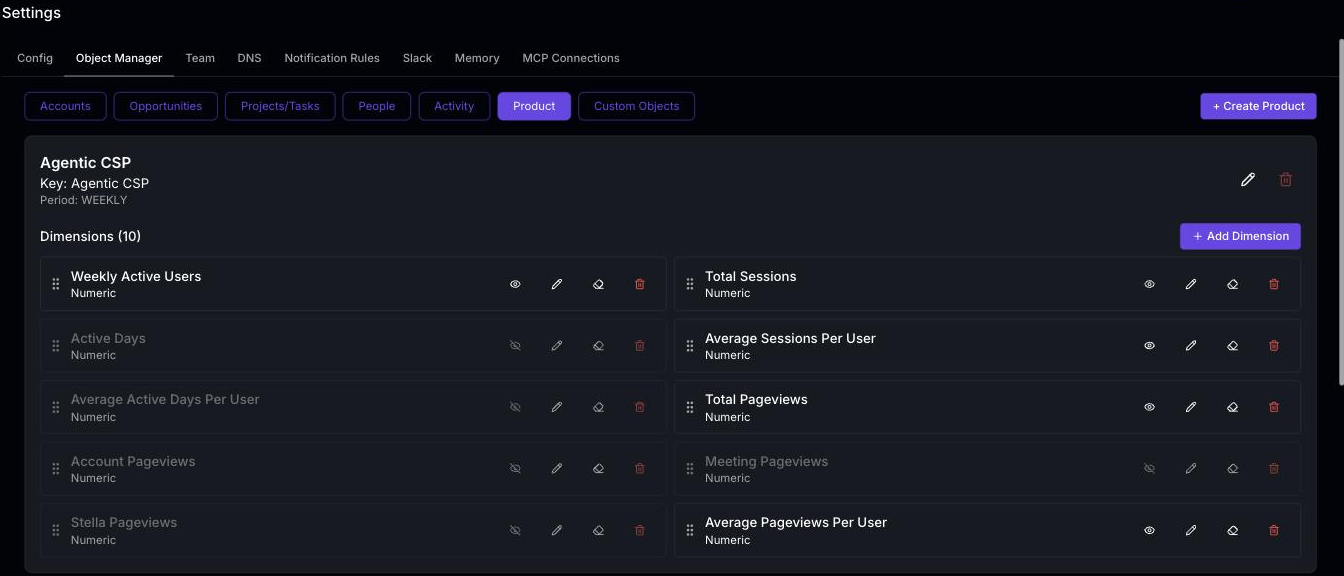
Creating a Product
- Go to the Product tab
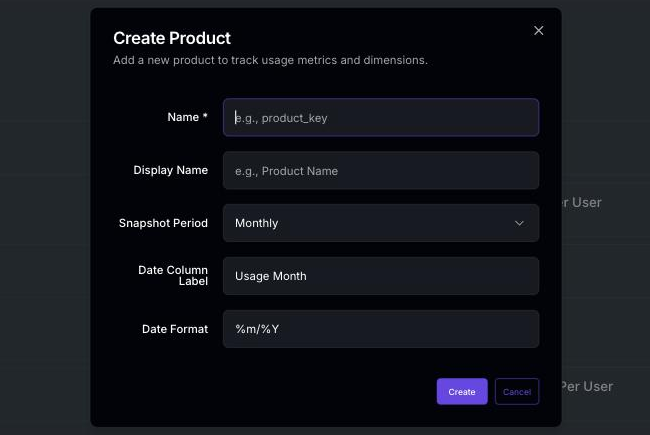
- Click + Create Product
- Fill in the product details:
- Click Create
Editing a Product
Click the pencil icon on a product card to open the edit dialog and update its settings.The snapshot period configured on a product determines the period its usage widget reads. CSV Import integrations set their own snapshot period during setup; if an integration’s period differs from the product’s, the wizard warns that usage written at the integration’s period will not appear on the product’s widget.
Deleting a Product
To delete a product from the catalog:- Navigate to the Product tab in Object Manager
- Click the delete icon on the product card
Deleting Dimensions
To remove dimensions and all their associated data from a product:- Click Delete Dimensions on the product card
- A warning dialog will appear — review it carefully, as this action removes both the dimensions and all associated usage data
- Confirm to proceed
Clearing Dimension Data
To remove usage data for a product’s dimensions while keeping the dimensions themselves:- Click Clear Dimension Data on the product card
- A warning dialog will appear — review it carefully, as this action removes all stored usage data for the product’s dimensions
- Confirm to proceed
Managing Dimensions
Dimensions are measurable attributes associated with a product (e.g., active users, storage used, API calls). Each product card shows its dimensions below the product details.Adding a Dimension
- Click + Add Dimension on the product card
- Enter the dimension name
- Select the dimension type:
- Configure display settings (see below)
- Click Create
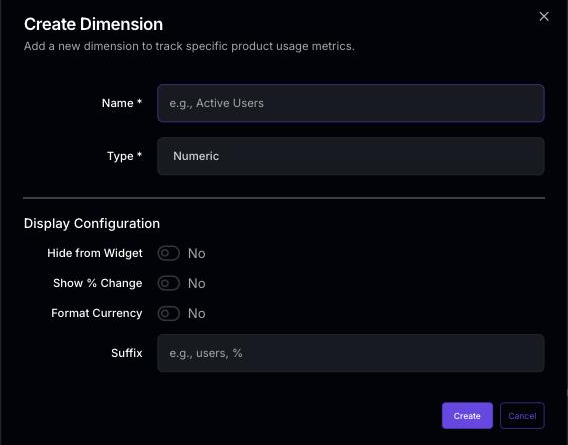
Dimension Display Configuration
When creating or editing a dimension, you can configure how values are displayed:Reordering Dimensions
Drag and drop dimensions using the grip handle to change their display order on the product usage widget.Dimension Visibility
Toggle the eye icon on a dimension to show or hide it from the product usage widget without deleting it.Custom Objects
Custom objects let you create entirely new entity types beyond the standard ones.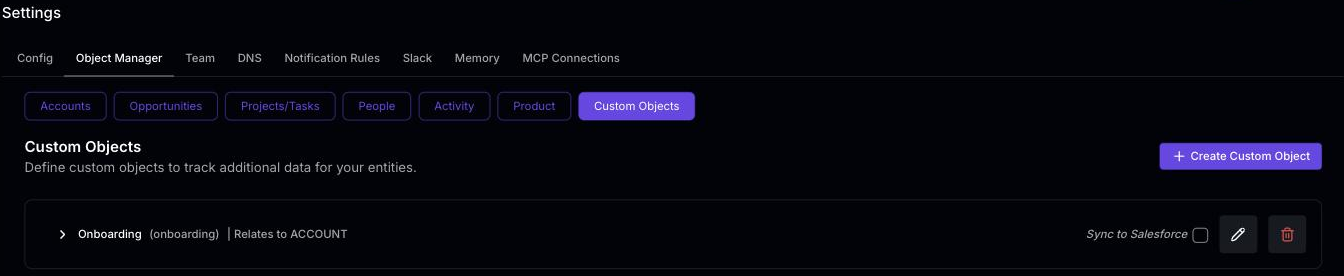 Creating a Custom Object:
- Navigate to the Custom Objects tab
- Click + Create Custom Object
- Define the object name and description
- Add fields to capture relevant data
- Save the custom object
Editing Record Values
Users can edit a custom object record’s field values directly — inline in the record grids and in the record detail sheet. As an admin, you control which fields are editable:- Fields created in Statisfy are editable as soon as they exist.
- Fields synced from a CRM are locked by default. To unlock one, edit the field and turn on Editable. Edits to synced fields also require the object’s Sync to Salesforce writeback to be on, so the change can be pushed back to the CRM. See the Salesforce Bi-Directional Sync Guide.
Clearing a synced field’s value in Statisfy isn’t supported — the save is refused. Clear the value in the CRM instead.
Custom objects are an advanced feature. Contact your Statisfy account team if you need guidance on structuring custom objects for your use case.