> ## Documentation Index
> Fetch the complete documentation index at: https://help.statisfy.com/llms.txt
> Use this file to discover all available pages before exploring further.
# Jira Integration
> Connect Jira and Jira Service Management to Statisfy, then use self-serve project rules to map issues to accounts and Statisfy tasks.
The Jira integration pulls issues from your Jira Cloud instance into Statisfy as **tasks** linked to the right customer accounts. After the one-time OAuth connection, you control which projects sync, how issues map to accounts, and which Jira fields land on the Statisfy task — all from **Integrations → Jira → Settings**, without contacting support.
This page covers both **Jira Software / Business** projects and **Jira Service Management** (JSM) projects. You can find the shared self-serve concepts — resolvers, field mappings, schedules, configuration history — in [Integration Concepts](/integrations/self_serve_configuration).
## Video Tutorial
## What Statisfy Pulls from Jira
| Data Type | Description |
| --------------------- | ---------------------------------------------------------------------------------------- |
| **Support tickets** | JSM tickets (Service Management projects) |
| **Customer requests** | Issues from Software / Business projects (feature requests, bugs, account-specific work) |
| **Task fields** | Configurable list of Jira fields → Statisfy task fields (custom and system) |
| **Account fields** | Configurable list of Jira fields → Statisfy account custom fields |
Each Jira issue becomes a Statisfy **task** (or — in projection-only mode — only writes back to the linked account without creating a task; see [Projection Mode](#projection-mode-creates-task--false) below).
## Prerequisites
* **Admin access** to both **Jira** and **Statisfy**
* Jira Cloud (Server / Data Center is not supported through the self-serve flow)
* The Jira projects you want to sync are accessible to the account that runs the OAuth connection
## Connect Jira to Statisfy
1. **Log in to Statisfy.**
2. Navigate to **Integrations → Admin Apps → Jira → Connect**.
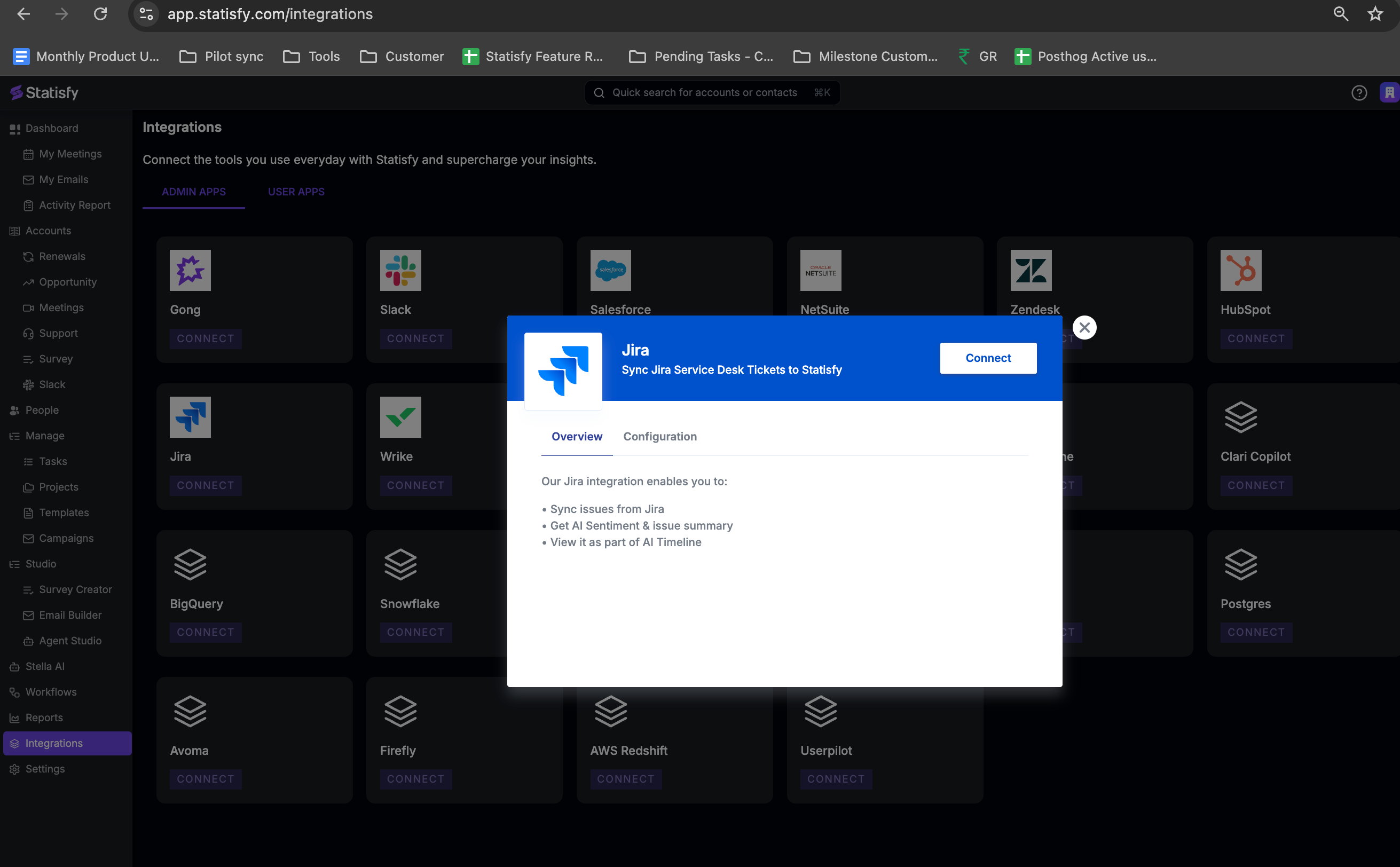
3. Complete the **OAuth authorization** flow to grant Statisfy read access to your Jira instance.
4. Once connected, Jira appears as **Connected** on the Integrations page.
**Jira and Jira Service Management are configured separately.** If you use both, connect each one and configure its own project rules. They appear as two integrations: **Jira** and **Jira Service Management**.
## Configure Project Rules
Open **Integrations → Jira → Settings**. The settings page is organized around **project rules**: each rule is a saved configuration for one Jira project (and, optionally, a subset of its issue types) that tells Statisfy how to handle issues from that project.
You can have **multiple rules per project** — for example, one rule for `Bug` and `Story` issue types in the `PROD` project, and a different rule for `Epic` issues in the same project with different field mappings and customer-matching logic.
### Anatomy of a Project Rule
Each rule has the following sections:
| Section | What it controls |
| ------------------------------ | ----------------------------------------------------------------------------------------------------- |
| **Project Key** | The Jira project the rule applies to (e.g., `PROD`, `CS`, `SUPPORT`) |
| **Project Type** | `software`, `service_desk`, or `business` — auto-detected from Jira |
| **Issue Type Filter** | (Optional) An include or exclude list of issue type names. Omit for "all issue types in this project" |
| **Customer Resolution** | Chain of resolvers tried in order — first match wins |
| **Field Whitelist** | Which Jira fields to copy to the Statisfy task and to the linked account |
| **Creates Task** | Toggle. When off, the rule writes account fields but does not create a Statisfy task |
| **Support Multiple Customers** | Toggle. When on, a single issue can link to multiple accounts |
| **Active** | Toggle. Inactive rules are kept for reference but don't run |
### Add a Project Rule
1. On the Settings page, click **Add Project Rule**.
2. Pick the **project** from the dropdown — Statisfy lists projects your OAuth user can access.
3. (Optional) Add an **Issue Type Filter** — pick `include` or `exclude` and choose one or more issue type names. Leave empty to match all issue types in the project.
4. Configure **Customer Resolution** (next section).
5. Configure **Field Whitelist** (next section).
6. Save. The rule will run on the next scheduled sync; use **Run Sync Job** to pull immediately.
## Customer Resolution
Customer resolution decides which Statisfy account each Jira issue belongs to. You configure a **chain of resolvers** — Statisfy tries each in order and stops at the first match. This handles cases where, for example, an Organization field is set on most issues but a few rely on a Reporter's email domain.
Each resolver in the chain has:
* **Resolver type** — how the value identifies an account
* **Source** — which Jira field, custom field, or attribute to read
* **Transforms** (optional) — reshape the value before matching (strip a prefix, regex-extract, etc.)
Supported resolver types:
| Resolver | What the source should provide |
| ----------------------- | -------------------------------------------------------------------- |
| **CRM Account ID** | Salesforce / HubSpot account ID stored on the issue |
| **Statisfy Account ID** | Native Statisfy account ID stored on the issue |
| **Organization ID** | An external org identifier stored on the issue or organization |
| **Email Domain** | The reporter's email domain, or any field that contains a domain |
| **Account Name** | A company name field (fuzzy matching, with a tunable cutoff) |
| **Custom Field** | Any Statisfy account custom field, matched against the issue's value |
For **Jira Service Management**, the most common pattern is: try the issue's **Organization** custom field first (JSM Organizations map cleanly to customer accounts), then fall back to the **reporter's email domain**.
### Source examples
The "source" for a resolver can be:
* A standard Jira field (`reporter`, `assignee`, `summary`)
* A custom field — referenced by Jira custom field ID (`customfield_10101`) or by display name (`Customer Account`)
* A path into the reporter's profile (`reporter.emailAddress`)
* A JSM Organization
The settings UI lets you pick from a dropdown of fields it discovers on the project; type a custom field ID to use one not in the list.
### Transforms before matching
If the source value isn't quite what the resolver expects, chain one or more [column transformers](/integrations/self_serve_configuration#column-transformers) before it: `strip_prefix`, `regex_extract`, `split_first_token`, `lookup`, `skip_if_equals`, `skip_if_contains`. For example: extract a domain from an email with `regex_extract` (`@(.+)$`), or strip a `crm_` prefix from a custom field value.
### Support Multiple Customers
By default, each issue links to at most one account. Toggle **Support Multiple Customers** on if a single issue legitimately belongs to several accounts (for example, a multi-tenant incident). Statisfy will write the task and any account-field updates against every match.
**Issues that match no resolver are skipped.** Statisfy will not create new accounts from Jira issues. If a project has many issues with no obvious customer link, either add a broader resolver to the chain (e.g., email domain as a last resort) or accept that those issues will be skipped.
## Field Whitelist
The **field whitelist** controls which Jira fields are copied to Statisfy, and where.
There are two whitelists per rule:
* **Task fields** — copied to the Statisfy task created from the issue
* **Account fields** — copied to the Statisfy account the issue resolves to
For each entry, pick:
* **Jira field** — by custom field ID or display name
* **Statisfy field key** — the target custom field on the task or account
Example task-field mappings:
| Jira Field | Statisfy Task Field |
| ------------------------------ | ------------------- |
| `Priority` | `task_priority` |
| `customfield_10042` (Severity) | `severity` |
| `assignee.displayName` | `engineering_owner` |
Example account-field mappings:
| Jira Field | Statisfy Account Field |
| -------------------------------------- | ---------------------- |
| `customfield_10100` (Renewal Risk) | `renewal_risk_flag` |
| `customfield_10101` (Last Outage Date) | `last_outage_date` |
The Statisfy custom field must exist in **Object Manager** with a compatible type (e.g., a date field for date values). Create it there first if needed.
### Tenant-level defaults
You can set a **tenant-level default whitelist** that applies to every rule. Per-rule whitelists override the defaults — useful when one project needs a totally different mapping but most projects share the same handful of fields.
## Projection Mode (creates\_task = false)
Some Jira projects are useful as a **signal source on the account**, but you don't want every issue to become a task in Statisfy. For those, turn off **Creates Task** on the rule.
In projection mode, the rule still:
* Resolves each matching issue to an account
* Applies the **account** field whitelist (copies Jira fields to the account)
But it does **not**:
* Create a Statisfy task for the issue
Typical use: a Jira project that tracks an internal lifecycle (e.g., onboarding milestones) where you only care about the latest status on the account, not a per-ticket task list.
## Schedule
Project rules inherit the integration's default cadence (typically `WEEKLY`). To run a rule more often, override the schedule on the rule — `HOURLY` through `MONTHLY` are available. See [Schedule](/integrations/self_serve_configuration#schedule).
## Sync Behavior
**Scheduled Jobs:**
* Each rule pulls issues updated since the last sync.
* The first run after connecting is a **bootstrap** covering the last 30 days; subsequent runs only fetch deltas.
* Inactive rules are skipped.
**Error Handling:**
* Per-rule errors are logged but do not block other rules from running.
* Issues that match no resolver are skipped (logged for audit).
### Run a Sync On Demand
Use the **Run Sync Job** button on the settings page to enqueue an immediate sync without waiting for the schedule. The job's status (queued / running / completed / failed) and timestamps show on the same page.
## Configuration History
Every save creates a new version. The header shows whether the active config is `Database (vN)`, `Default (Code)`, or `Not Configured`. See [Configuration History](/integrations/self_serve_configuration#configuration-history).
## Security
* The OAuth connection uses read-only Jira scopes — Statisfy cannot modify issues, projects, or users.
* Tokens are stored encrypted in Google Cloud Secret Manager and refreshed automatically.
* Project rules are only ever applied to projects your OAuth user can access — losing access to a project in Jira immediately stops Statisfy from pulling it.
## Troubleshooting
* Confirm there is at least one **active** project rule.
* Check that the OAuth user can see issues in the project (sign in to Jira as that user and open the project).
* Use **Run Sync Job** and watch the job status — failures show the underlying error.
* Verify the **Customer Resolution** chain points at a field that is actually populated on the issues.
* Run a **preview** in the rule editor — Statisfy will show the resolver result for a sample of issues.
* Add a fallback resolver (e.g., email domain) to handle issues missing the primary identifier.
* For Custom Field resolvers, confirm the Statisfy custom field is populated on the target accounts (the value on the issue has to match a value on the account).
* Confirm the field is in the rule's **Field Whitelist** (task or account, depending on where you expect it).
* Confirm the Statisfy custom field exists in **Object Manager** with a compatible type.
* For custom fields, prefer the Jira custom field ID (`customfield_10042`) over the display name to avoid ambiguity if a field is renamed.
* Use the rule's **Issue Type Filter** with `include` to whitelist exactly the types you want, or `exclude` to drop noisy ones (e.g., `Sub-task`).
* Filters are applied at sync time, so changes only affect issues fetched after the next run.
* Turn on **Support Multiple Customers** on the rule.
* Configure resolvers that can produce multiple matches (e.g., a multi-value custom field of organization IDs).
## Need Help?
For OAuth issues, complex resolver chains, or migrating from a legacy Statisfy-managed Jira config, contact [support@statisfy.com](mailto:support@statisfy.com).